


Compass: Real Estate & Homes
4.5139.00 Reviews
App Specs
- Version
- 26.34.0
- Updated On
- License
- Free
- Downloads
- 100,000+
- Developer
- Compass Inc.
- Categories
- House & Home
- Platform
- Android
Screenshots

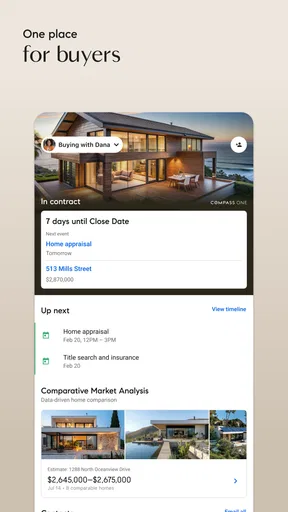


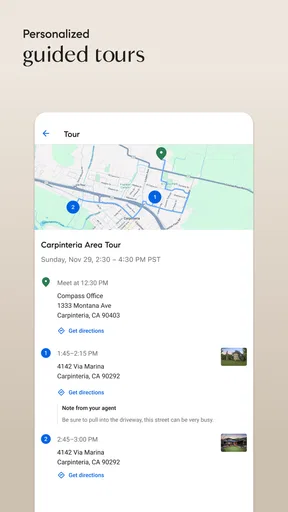
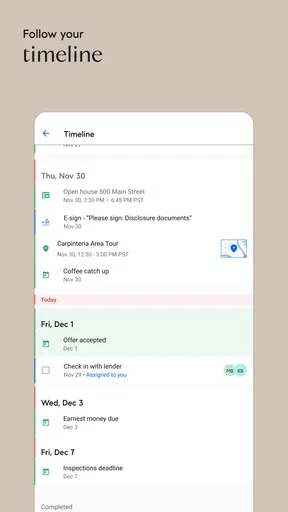
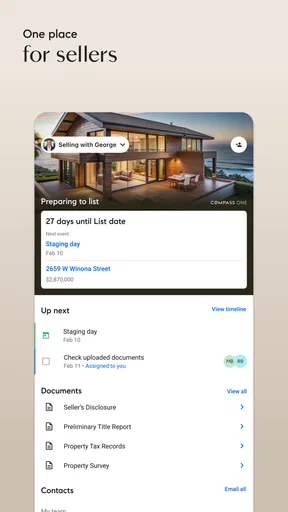

 Analysis by AppCompare
Finding a home is rarely a neat, one-step task. I might be browsing rentals on a lunch break, checking whether a particular block suits my commute, or weighing a possible move months before I’m ready to act. Compass: Real Estate & Homes is most useful when I want one place to explore properties and, if I’m ready, connect with a real estate agent. It is a free house-and-home app from Compass Inc., and its focus on agent-assisted searches gives it a different feel from a simple listing browser.
A useful starting point, not a complete moving plan
I’d treat this app as a way to narrow down possibilities rather than as a substitute for every step of a property search. Browsing, comparing, and keeping track of homes can help turn a vague idea into a more practical shortlist. But a listing is only a starting point: the app cannot make a home fit a budget, settle a negotiation, or replace an in-person look at the property.
That distinction matters most if you are just curious. You can use a real estate app to learn what kinds of homes are available in an area without being ready to contact anyone. If your search is serious, though, the agent connection may be a helpful route from browsing toward asking questions and arranging next steps.
Where it fits among real estate apps
Compared with the usual property-search alternatives, Compass puts more emphasis on connecting a search with real estate agents. That can be a plus when you want guidance or are unfamiliar with the local market. A broad listing marketplace may suit someone who wants to scan properties independently across many regions, while a rental-focused service may be a better fit for a renter whose main concern is finding a lease quickly. I’d choose based on the task at hand, not assume one app will be best for every move.
There is also a practical trade-off in an agent-centered approach: personal help can make a complicated decision easier, but not every browser wants to start a conversation. If you prefer to research quietly, keep your options open, and contact an agent only after you have a shortlist, take your time with that step. A good search tool should support your pace rather than make you feel obliged to move faster.
Finding Your Dream Home Made Easy
First things first, the user interface of Compass is sleek and intuitive. From the moment you open the app, you're greeted with a clean design that makes navigation a breeze. Searching for properties is super straightforward. You can filter by location, price range, number of bedrooms, and more. It's like having a personal real estate agent right in your pocket.
One of the standout features for me was the map search. You can literally draw the area you’re interested in, and the app will only show listings within that boundary. It's perfect for those of us who know exactly where we want to live but just need to find the right house.
Worth Reading Before You Choose

EA SPORTS FC Mobile 26 Is a Bigger Football Game, but It Takes Time

Flipboard Shows What News Apps Must Do Beyond the Feed

Switching to Android Auto Means Rethinking Your Driving Routine

Google Calendar Makes a Crowded Week Easier to Manage

Ludo King Makes the Most of the Minutes Between Plans

Baby Panda World Brings Quick Play to Modern Phones, but Its Game Library Feels Busy
Make the map reflect your real routine
Drawing a search boundary is especially useful when a city’s official neighborhood labels don’t match how you actually live. I might want to stay near a transit stop, avoid a busy road, or keep a familiar route to work without relying on a broad neighborhood name. The boundary gives me a way to describe that preference visually. I’d start with a generous outline, see what appears, and then tighten it only if the results are too wide; drawing a tiny area too early can hide nearby options worth considering.
For a realistic everyday search, imagine checking listings between errands while deciding whether a move closer to work is worth pursuing. I could filter by the basics, draw around the streets I’d realistically travel from, and save a few candidates mentally or in my own notes for a closer look later. That workflow is more grounded than scrolling through every available home, because it ties the search to daily travel rather than just a map pin.
Detailed Listings and Insights
Once you find a property you're interested in, the listing details are incredibly comprehensive. We're talking high-quality photos, virtual tours, and even neighborhood insights. The app also provides data on school ratings, crime rates, and local amenities, which is a huge plus for families or anyone looking to get a sense of the community.
There's also a nifty feature where you can compare homes side by side. This is super useful when you're trying to decide between a couple of favorites. The app lays out all the details, so you can make an informed decision without flipping back and forth between screens.
Compare the compromises, not just the selling points
I find side-by-side comparisons most valuable when I decide in advance what I’m comparing. A lower asking price might come with a less convenient location; a larger home might mean a longer trip to the places I visit regularly. Putting a short list next to each other can make those trade-offs easier to notice, but I would still verify important details directly and visit in person before treating a listing as a serious option.
Neighborhood information is a prompt for better questions, not a final verdict on a community. School information may matter to one household and not another, while nearby amenities can look useful on a screen but feel less accessible in daily life. I’d use those details to guide a follow-up visit or conversation, rather than letting a single label decide whether a place is right for me.
Connect with Top Agents
Another aspect I loved about Compass is its connection with high-caliber real estate agents. The app offers a list of top agents in your area, complete with reviews and ratings from other users. You can schedule a meeting or request more information directly through the app, making the process seamless and efficient.
Having access to experienced agents is invaluable, especially if you're new to the home-buying game. They can provide insights and advice that you might not find on your own, and with Compass, reaching out to them is a breeze.
Choose the right moment to contact an agent
I wouldn’t reach out simply because I have opened a listing. First I’d make a concise shortlist and note what I still need to know: whether the location works at my usual travel times, which property details need clarification, and what kind of viewing or conversation would help me decide. That preparation can make an initial enquiry more useful and helps keep the conversation focused on my actual needs.
If you already have an agent you trust, the app can still be useful as a browsing companion, but you may prefer to coordinate decisions with that person rather than treat the in-app connection as your only route. If you have no agent and want a human point of contact, that connection is more relevant. The best choice depends on whether you want independent research, professional guidance, or a mix of both.
Stay Updated with Real-Time Alerts
Real estate can move fast, and Compass ensures you don’t miss out on the perfect opportunity. The app allows you to set up real-time alerts for new listings, price changes, or open houses that fit your criteria. It’s like having your finger on the pulse of the market at all times. You'll get notifications that keep you in the loop, so you can act quickly when something catches your eye.
Use alerts without letting them take over
Alerts are most useful when the search criteria are specific enough to be meaningful. If I set a broad location and leave too many possibilities open, updates can become noise rather than help. I’d begin with the features I genuinely need, then widen the search deliberately if it is too restrictive. That way, a notification has a better chance of prompting a useful review instead of another round of aimless scrolling.
For anyone who is not ready to move immediately, alerts can also act as a low-pressure way to watch how a search area changes. I’d treat them as a reason to revisit a listing, not as a demand to respond at once. A notification cannot tell me whether a property suits my circumstances, and speed should not replace careful checks when the decision is significant.
What Sets Compass Apart?
Now, I've used a fair share of real estate apps, but what sets Compass apart is its commitment to user experience. The combination of advanced search tools, detailed listings, and the ability to connect with expert agents makes it a powerful tool for anyone in the market for a new home.
Plus, the app is constantly being updated with new features and improvements, showing that the developers are genuinely interested in providing the best experience possible. Whether you're a first-time buyer or a seasoned real estate investor, Compass caters to a wide range of needs.
The best fit depends on what you expect from a search
I’d recommend it most to people who have a defined area in mind, want to compare homes with more care than a quick scroll allows, and may value a connection to an agent. It can also suit someone beginning to explore buying or renting, because browsing can help clarify priorities before a decision is close. Families may find location and neighborhood details useful as conversation starters, while a buyer choosing between several possibilities may appreciate having listings to compare.
I’d be less inclined to make it my only tool if I needed a broad, independent sweep across many markets, or if I wanted a service focused entirely on rental administration rather than finding a property. It is also not the right answer for someone expecting an app to establish whether a home is sound, confirm every detail, or make a major financial decision on their behalf. Those tasks still call for direct checks and, where appropriate, professional advice.
What to expect before installing
The app is rated for Everyone and is free to install, so there is no purchase decision involved in trying it. It has an average rating of 4.4 from around 870 ratings, and has passed 100,000 installs. I see those figures as useful context about its reach, not proof that every listing or search will match what a particular person needs.
It was released in 2019, and version 2.90.0 is the current version. On Android, it requires version 6.0 or later. Those details make it easier to decide whether an older device is compatible, but the more important question is whether an agent-connected property search suits the way you want to look for a home.
Final Thoughts
In conclusion, if you're on the hunt for a new home, or just curious about the real estate market, Compass: Real Estate & Homes is definitely worth checking out. It makes the process of buying or renting a home less daunting and more exciting. With its robust features and user-friendly interface, it's like having a real estate expert right at your fingertips.
So, why not give it a try? You might just find your dream home waiting for you. And, of course, you can download it for both Android and iOS right from our site. Happy house hunting!
Pros
- User-friendly interface enhances navigation.
- Comprehensive property listings available.
- Real-time market updates keep you informed.
- Customizable search filters for precise results.
- Built-in mortgage calculator aids budgeting.
Cons
- Limited coverage in rural areas.
- Occasional app crashes reported.
- Requires constant internet connection.
- Some features locked behind sign-up.
- Notifications can be overly frequent.
FAQs for Compass: Real Estate & Homes
What features does Compass: Real Estate & Homes offer?
Compass: Real Estate & Homes provides a range of features designed to enhance your real estate experience. Users can access detailed property listings, high-quality photos, virtual tours, and neighborhood insights. The app also offers personalized recommendations based on your preferences and a seamless communication platform with agents to facilitate easy inquiries and appointments.
Is the Compass app free to use, and are there any in-app purchases?
The Compass app is free to download and use for browsing listings and accessing most features. However, certain advanced features or premium services may require in-app purchases or subscriptions. It's important to review the app’s pricing details within the app store to understand which features might incur additional costs.
How accurate are the property listings and information on Compass?
Compass strives to provide accurate and up-to-date property listings by collaborating with professional agents and utilizing advanced data analytics. While efforts are made to ensure the accuracy of information, users should verify details with agents directly, especially for critical decisions like pricing, availability, and legal terms.
Can I sell my property on Compass, and what’s the process?
Yes, you can list your property for sale on Compass. The process typically involves contacting a Compass agent who will guide you through property valuation, listing preparation, and marketing strategy. The app provides tools to manage your listing, track interest, and communicate with potential buyers directly from your mobile device.
What platforms is Compass: Real Estate & Homes available on?
Compass: Real Estate & Homes is available on both Android and iOS platforms. Users can download the app from the Google Play Store for Android devices or the Apple App Store for iOS devices. The app is designed to provide a seamless experience across both platforms, ensuring accessibility for a wide range of users.


